How High Refresh Rate Change the Productivity?
Monitors
High refresh rates are typically associated with gaming monitors, where performance is crucial. On productivity monitors, we usually see refresh rates of 60Hz and 75Hz, which are more common for everyday tasks like office work and browsing. Now, MSI is trying to change all of that. We plan to offer more High Refresh Rate Monitors for productivity users.
What is the important thing for picking a Productivity Monitor?
Before talking about the benefit of High Refresh Rate, we must realize the most important factor when working on the monitor. Maybe it’s color accuracy or image quality. However, when using monitors for work, everyone has shared concerns. One of the most significant is that we often have to look at the screen for a long period, unlike gaming, which we might only play for 3-5 hours a day. For productivity, spending long hours in front of a monitor requires features that prioritize eye comfort and visual clarity. According to ILO(International Labour Organization), people work nearly 40 hours a week. Therefore, a productivity monitor needs some features to care for our eyes.
What‘s the benefit of High Refresh Rate?
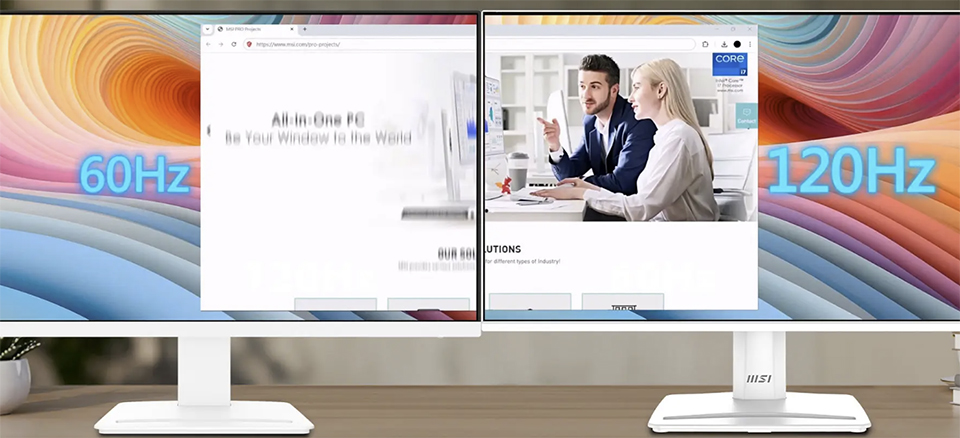
As mentioned earlier, eye comfort is a crucial factor for productivity. High Refresh Rate, which provides more frames per second (fps) if the PC performance is enough. When we are gaming, it improves our gaming performance. Everything gets smoother and clearer and High Refresh Rate also does a good job while we’re working. With a higher refresh rate, the mouse cursor movement and page scrolling feel noticeably faster and smoother, without stutter. If you've been accustomed to 60Hz in the past, the difference when switching to 120Hz is significant. The increased smoothness and clarity help us focus more easily on tasks. Reduced stutter and flicker also lessen eye strain, contributing to overall comfort and a healthier work environment.
More Features to Protect Our Eyes: EyesErgo and TÜV Rheinland
MSI developed EyesErgo technology. This technique can decrease the flicker on the monitor in order to relieve the stress of the eyes. For more technical knowledge about EyesErgo please click the below link.
https://www.msi.com/blog/screen-flicker-and-its-impact-on-eye-health
MSI uses an eye-care panel in our monitors, certified by TÜV Rheinland for eye comfort. Additionally, the Eye-Q Check feature allows us to monitor our eye health. If you start to feel discomfort in your eyes, simply check Eye-Q Check — It might be time to give your eyes a break.
https://www.msi.com/blog/screen-flicker-and-its-impact-on-eye-health
MSI uses an eye-care panel in our monitors, certified by TÜV Rheinland for eye comfort. Additionally, the Eye-Q Check feature allows us to monitor our eye health. If you start to feel discomfort in your eyes, simply check Eye-Q Check — It might be time to give your eyes a break.
Optimize the WorkFlow and Enhance the Efficiency
MSI Pro MP252 E2 includes all the features that we introduced above. While MSI has designed many functions to protect your eyes, it’s still essential to take regular breaks to maintain eye health. To further support this, MSI is adding features to optimize workflow on-screen. By helping you finish tasks more efficiently, you’ll have more time to rest your eyes away from the screen. Here are two key features aimed at improving work efficiency.
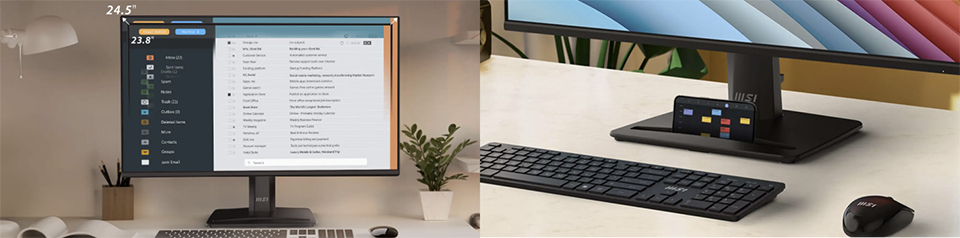
1. 24.5-inch display, 92% screen-to-body ratio.
2. Accessory Slot Design.
2. Accessory Slot Design.
MSI Pro MP252 E2 is a 24.5-inch display with a 92% screen-to-body ratio, offering a larger screen compared to the typical 23.8-inch office monitors. This extra space allows for a clearer, more expansive view, enhancing both productivity and visual clarity. Additionally, MP252 E2 has an accessory slot at the bottom of the monitor. It keeps our workspace organized and clutter-free. Ideal for cables, adapters, or other essentials, it enhances efficiency and maintains a tidy environment.