Dominate Rockay City with MSI's MAG Infinite S3 Gaming Desktop
Desktops ,
Monitors
505 Games, the well-known game publisher that has released "Death Stranding", "Control" and "Payday 2", is about to launch the latest First-Person Shooter Action game "Crime Boss: Rockay City". After former crime boss death, you need to choose your team to fight for the throne of Rockay City. You can choose to fight alone or finish the jobs with your buddies. Either way, you always need a suitable gaming PC and monitor to help you win every battle. MSI MAG Infinite S3 and G2712 will be your best weapon.


MAG Infinite S3 is based on Intel's 13th-generation processors and DDR5 memory to build up. It offers great game performance. In particular, DDR5 memory supports higher frequencies when data is running, a 50% performance boost, and is faster than DDR4 memory.

In display performance, MAG Infinite S3 uses NVIDIA® GeForce RTX™ 4070 GPU and Silent Storm Cooling design to optimize airflow for maximum CPU and GPU performance. It can deal with current mainstream games on the market. Let's see how the game is performing on MAG Infinite S3.
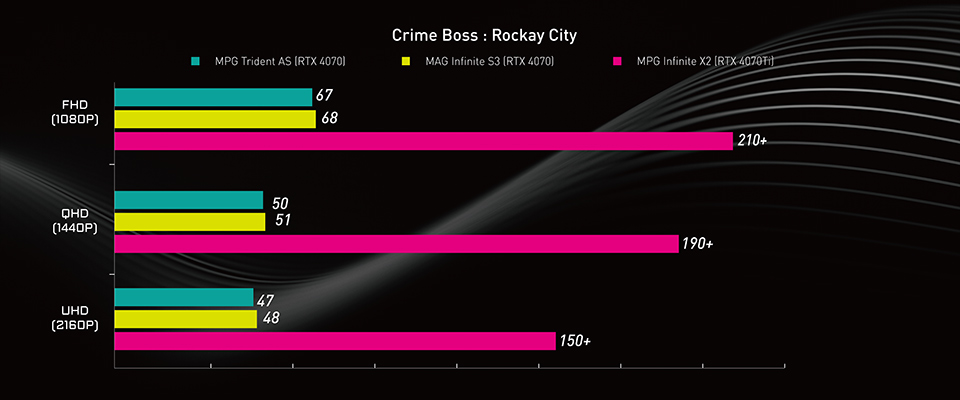
Noted: In the test, we found the performance issue on RTX 4070, wish the game developer can fix it in the future.
In addition, you don't need to worry about future system upgrades and maintenance. The MAG Infinite S3 is all designed with standard components that you can easily upgrade or replace as you needed.

The G2712 monitor is an eSports-grade monitor with an IPS panel and high refresh rate design. You can see a clear view during target movement. Especially when playing First-Person Shooter games, you can defeat enemies without losing your chance to aim first and then shoot.


The high refresh rate and response time can help you more easily to aim target.
Why Choose MSI Gaming Desktop Solutions? What is the MSI Pre-built advantage?
One Stop Service
MSI Care provides an easy way to take care of your desktop PC. When you need to send a PC for RMA service, you can call for immediate support to pickup and delivery. When the product is returned to the service center, a professional technician will help resolve the issue. Most DIY PCs are assembled using hardware components from different brands. Therefore, something goes wrong with the system and needs to be troubleshoot, and then the user has to disassemble the entire desktop. To verify each components one by one, and if multiple hardware failures are found, it must be sent to a different location for warranty service. Choose MSI gaming solution, so you don't have to worry about it anymore. MSI Care will take care of you.
Plug & Play
Do you feel trouble to find the right gaming desktop to play games when new games release? MSI gaming desktops have gone through numerous tests, allowing users to easily play games without any worries. Just plug it in, connect a monitor, and play game. DIY PCs usually have complicated compatibility issues between different components, especially memory and CPU. The number of memory channels and frequency affects the stability and performance of the system. CPU voltage and fan curves optimize are also related to thermal and acoustics performance. That's why we can guarantee that the game performance can run on MSI gaming desktops and monitors for user reference.

The best hardware and software integration
MSI uses its own reliable hardware to build the stability and durability system. It also provides useful software to help users manage their gaming system. Through the platform design concept, an exclusive application "MSI Center" was developed. It can save system storage space, no extra applications are installed, and you can choose the applications you need to install. And we will keep updating more applications to meet user demand.

MSI Center can let you choose the application you want to use then install without unnecessary waste.
In addition, you may get into trouble and then need a little help when you using PC. It can be difficult to find help in a very short period of time. The MSI Center support page offers many ways let you to seek help. Troubleshooting guides, user discussions on the forums, hotline services, or RMA service locations. You can easily find a solution to your problems.

Finally, if you are interested in playing different games on MSI gaming desktops or monitors, you can visit our website to find a suitable setup. Select the game you want to play, your preferred monitor size and resolution and the system will show you how the game performs.
Find My Favor: https://www.msi.com/Landing/find_my_favor
Find My Favor: https://www.msi.com/Landing/find_my_favor
Learn more about MPG Infinite X2 13th :
https://www.msi.com/Desktop/MPG-Infinite-X2-13FX
Learn more about MPG Trident AS 13th :
https://www.msi.com/Desktop/MPG-Trident-AS-13th
Learn more about MAG Infinite S3 13th :
https://www.msi.com/Desktop/MAG-Infinite-S3-13th
Learn more about G2712:
https://www.msi.com/Monitor/G2712
https://www.msi.com/Desktop/MPG-Infinite-X2-13FX
Learn more about MPG Trident AS 13th :
https://www.msi.com/Desktop/MPG-Trident-AS-13th
Learn more about MAG Infinite S3 13th :
https://www.msi.com/Desktop/MAG-Infinite-S3-13th
Learn more about G2712:
https://www.msi.com/Monitor/G2712